







The Easiest Way to Use Sleepbuds (No Bluetooth Required)
When people first get their Ozlo Sleepbuds, they often assume they work like regular wireless earbuds: connect to Bluetooth, open an app, and start playing something.
But Sleepbuds were designed for something very different: reliable, all-night sleep sound.
That’s where ‘Simple Mode’ comes in.
If you want the fastest, easiest way to fall asleep with Sleepbuds, Simple Mode lets you use them without worrying about Bluetooth connections at bedtime.
Just put them in, press play, and sleep.

What Is Simple Mode?
Simple Mode is like a paired down super simple way to use Ozlo Sleepbuds if you simply just want to play noise-masking sounds without any other bells and whistles.
Instead of connecting to your phone each night, you can download a sleep sound directly to your Sleepbuds, or use the default sleep sound, and play it automatically when you’re ready for bed.
That means:
-
No Bluetooth connection required at bedtime
-
No phone needed once everything is set up
-
Just insert your Sleepbuds and fall asleep to noise-masking sound
It’s the closest thing to “set it and forget it” sleep technology.

Why Some People Prefer Simple Mode
Many Sleepbuds users love streaming audio or adjusting settings in the app. But for others, the goal is simple:
Block out noise and fall asleep quickly.
Simple Mode is perfect for people who want:
A Faster Bedtime Routine
Instead of connecting devices or opening apps, your sleep sound is already ready to play.
Reliable All-Night Playback
Because your sound is stored directly on the Sleepbuds, less battery power is being used and playback is even more stable all night.
Less Tech at Night
Some people want fewer screens and fewer steps at bedtime.
Simple Mode lets Sleepbuds feel less like electronics and more like a dedicated sleep tool.

Who Simple Mode Is Perfect For
Simple Mode is especially helpful if you:
-
Just want noise masking to fall asleep
-
Don’t want to deal with Bluetooth connections at night
-
Want the most reliable all-night playback
-
Prefer a simple, minimal bedtime routine
-
Share a bedroom and want quiet sleep without disruption
For many users, it quickly becomes their favorite way to use Sleepbuds.

How Simple Mode Works
Setting it up only takes a minute.
-
Open the Ozlo Sleep app
-
Choose the sleep sound you want to store on your Sleepbuds
-
Enable Simple Mode by choosing to disable Bluetooth
-
Insert your Sleepbuds when you're ready for bed
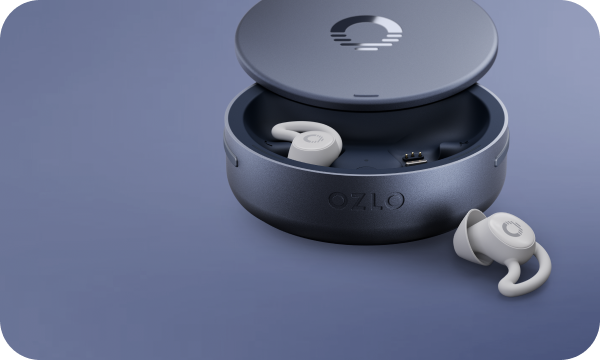
Your sound will begin playing automatically when you take your Sleepbuds out of the case. No Bluetooth connection needed.
From then on, bedtime becomes simple:
Insert Sleepbuds → hear your sleep sound → drift off.

Sleep Technology That Stays Out of Your Way
The best sleep technology shouldn’t feel like technology at all.
Simple Mode was designed for exactly that: helping you fall asleep faster with fewer steps and fewer distractions.
Because sometimes the best sleep routine is also the simplest one.
Try Simple Mode Tonight
If you’re looking for the easiest way to use your Sleepbuds, Simple Mode is a great place to start.
Download your favorite sleep sound, insert your Sleepbuds, and let the night fade into quiet.
Sleep well.


